
infra CONVERT
blue DAT • infra DAT
mdm TOOL
infra CONVERT
blue DAT • infra DAT
mdm TOOL


This is an old revision of the document!
Filters can be created, edited and saved in the Edit characteristic filter window. The window is only accessible when a drawing sheet is open. Then click on Filter characteristics ( ) or Edit characteristic filter (
 ) directly next to it in the main toolbar.
The current filter criteria can be viewed and edited in the main area of the window (3) . The management tools are located in the header on the right (2). The name of a filter is displayed on the left (1) if it is a saved filter. An asterisk (*) next to the name indicates that the currently set criteria differ from the saved criteria, i.e. they are not saved.
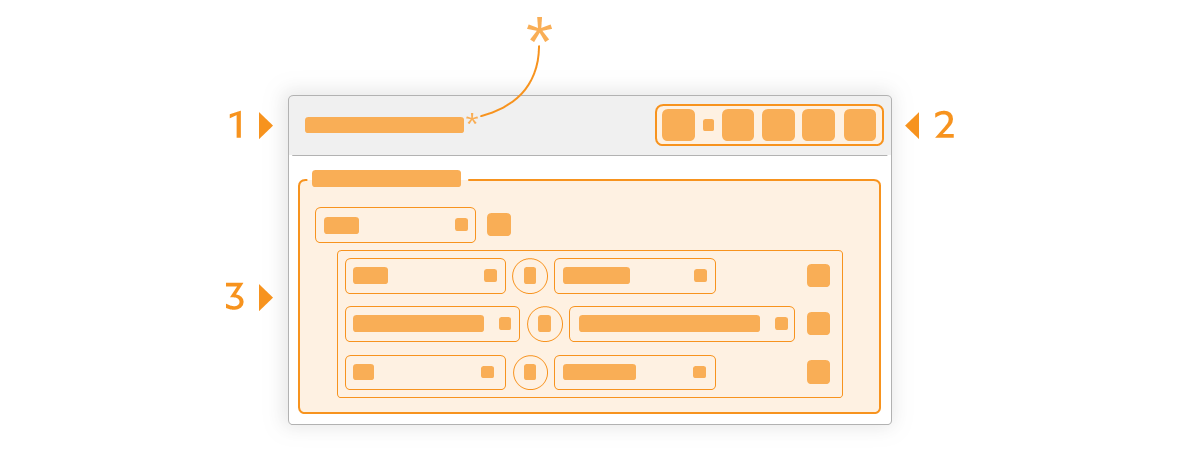
| Function | Short description | Reference | |
|---|---|---|---|
 | First argument | A characteristic property: Class, Category, Tag, Type. | |
| Operator | A logical operator: Is, And, Or. Several individual criteria can be linked to form a criteria group using And and Or. | ||
 | Equal/unequal operator | Equal or unequal operator with which a first and a second argument can be combined to form a criterion. | |
 |
|||
| | Second argument | A characteristic property that fits the first argument. | |
 | Add | Individual criteria can be added or deleted within a group of criteria (and/or link) using Add and Delete. | |
 | Delete | ||
Note Available from program version 4.3.0.
| Function | Short description | Reference | |
|---|---|---|---|
 | Save filter | Save the currently set filter criteria. If the filter has not yet been saved (“Unsaved filter” in the window title), you will be asked to enter a name for the filter in the next step. Press Confirm (  ) to accept the entry and Discard ( ) to accept the entry and Discard ( ) to cancel the saving process. ) to cancel the saving process.If a saved filter is edited (filter name with an asterisk (*) in the window title), it is overwritten with the currently set filter criteria. | |
| Save as… | Save the currently set filter criteria under a new name. In the next step, you will be asked to enter a name for the filter. Use Confirm () to accept the entry and Discard () to cancel the saving process. | ||
 | Open filter | Open a saved filter. Currently set filter criteria are overwritten with the new criteria. | |
 | Rename filter | Rename the currently open filter. In the next step, you will be asked to enter a name for the filter. Use Confirm () to accept the entry and Discard () to cancel the process. | |
 | New filter | Start with a new filter. The currently set filter criteria are reset to No selection. | |
 | Delete filter | Delete filter from the list of saved filters. | |


